

Hey Cazton
- Hey Cazton is a macOS menu bar app that keeps hotword detection entirely on-device and only calls Azure Whisper after you record something worth transcribing, protecting your privacy and controlling cloud costs from the start.
- The architecture cleanly separates AppKit shell control from SwiftUI surface rendering, giving the app native menu bar behavior without sacrificing the clarity of a modern declarative UI approach.
- Audio is captured in rolling chunks well below the 25 MB Azure limit, processed concurrently through a Swift actor, and reassembled in sequence order so long recordings produce accurate, ordered transcripts every time.
- The endpoint resolver accepts all common Azure OpenAI Whisper URL formats and normalizes them automatically, eliminating frustrating configuration mistakes for developers and end users alike.
- Transcript sanitization strips control phrases, mishearing variants, and filler words so the clipboard result is clean and ready to paste without any manual editing by the user.
- Cazton's AI consulting practice helps enterprises design voice-powered transcription pipelines that are privacy-respecting, cost-efficient, and built for production use from day one.
- Cazton's corporate training programs cover Swift, macOS development, Azure OpenAI, and cloud-native AI integration for engineering teams building applications like Hey Cazton.
- Contact Cazton to learn how your team can build or extend voice-driven utilities with Azure Whisper, SwiftUI, and enterprise-grade audio pipelines.
- Get Hey Cazton here! Streamline your workflow and benefit now!
Walkthrough Outline
- Product Shape and Core Architecture
- The App Shell: AppKit Outside, SwiftUI Inside
- Local Hotword Detection and Audio Pipeline
- Recording, Chunk Rotation, and Ordered Transcription
- Azure Whisper Integration and Endpoint Handling
- Transcript Cleanup, UI Polish, and State Management
- Build, Package, and Test Strategy
Product Shape and Core Architecture
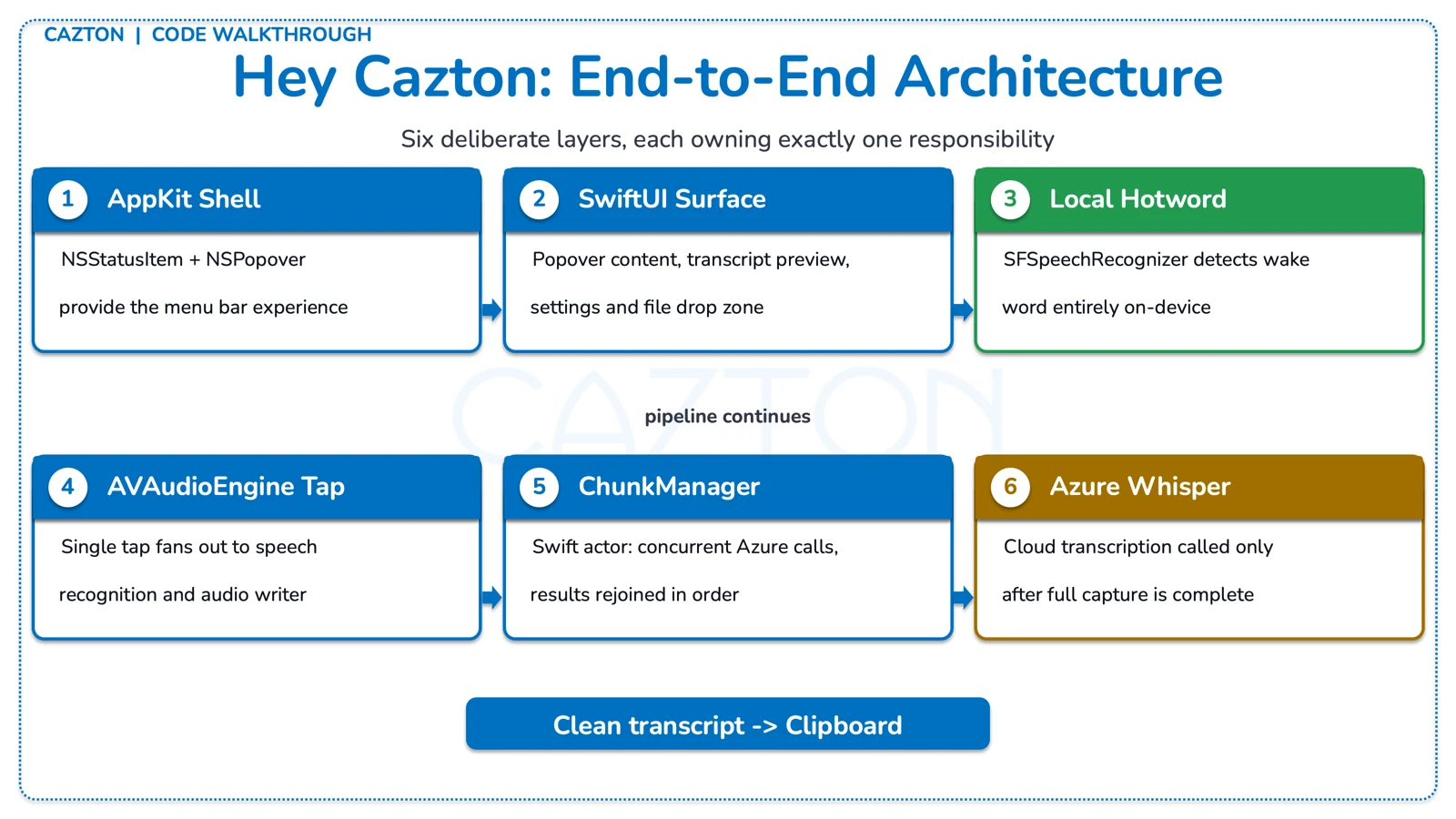
Hey Cazton is intentionally small from the user point of view: a menu bar icon, a floating recording indicator, and a transcript that lands in the clipboard. Under that simple surface is a carefully split pipeline that keeps hotword listening local, sends cloud requests only when useful, and makes Azure configuration flexible enough for real users.
The app does not keep a permanent cloud stream open, and it does not require a full desktop window to be useful. The whole experience is built around a single controller that owns permissions, audio capture, speech recognition, transcription, and UI state. Key architectural pillars include:
- AppKit shell:
NSStatusItemandNSPopoverprovide the menu bar experience. - SwiftUI surface: the popover content, transcript preview, settings, and file drop zone live in SwiftUI.
- Local listening:
SFSpeechRecognizerhandles hotword detection entirely on-device. - Shared audio tap: one
AVAudioEnginefans out to speech recognition and audio file writing simultaneously. - Cloud transcription: recorded chunks are posted to Azure OpenAI Whisper only after capture is complete.
- Final polish: the transcript is sanitized, copied to the clipboard, and surfaced in the UI.
Design goal: the app should feel always ready, but the cloud should only be involved when the user actually records something. That single choice shapes most of the code: local hotword detection, chunked file writes, deferred transcription, and a tight clipboard-first workflow.
The end-to-end flow follows a clean five-step sequence. The app listens locally for "Hey Cazton", "Stop Cazton", or "Quit Hey Cazton". When recording begins, WAV data is written to a temporary file. The file rotates to a new chunk before it reaches Azure's upload cap. Completed chunks are sent to Azure Whisper in sequence-aware order. Control phrases are stripped from the returned text before the result is copied to the clipboard.
The App Shell: AppKit Outside, SwiftUI Inside
A polished macOS menu bar app still needs AppKit control. SwiftUI is excellent for the content, but the menu bar icon, popover lifecycle, global click handling, and single-instance behavior are AppKit responsibilities that SwiftUI alone cannot fully own.
The app entry point is deliberately minimal. HeyCaztonApp declares no regular window scene, then hands control to an NSApplicationDelegate that builds the real shell. That keeps the user experience focused on the status item instead of a conventional application window.
HeyCaztonApp.swift
@main
struct HeyCaztonApp: App {
    @NSApplicationDelegateAdaptor(AppDelegate.self) private var appDelegate

    var body: some Scene {
        Settings { EmptyView() }
    }
}

final class AppDelegate: NSObject, NSApplicationDelegate {
    private let controller = WhisperController()
    private let popover = NSPopover()

    func applicationDidFinishLaunching(_ notification: Notification) {
        let item = NSStatusBar.system.statusItem(withLength: NSStatusItem.variableLength)
        popover.contentViewController = NSHostingController(
            rootView: MenuContentView(controller: controller, settings: controller.settings)
        )
    }
}
Why this split matters: menu bar behavior is not just a view problem. The app delegate also ensures a single instance, registers the bundled Nunito font, updates the icon and tooltip as state changes, and dismisses the popover on outside clicks, active-space changes, or the Escape key.
Popover behavior is treated like product behavior. The popover is not just shown and forgotten. The app installs global mouse monitors, local key monitors, and a notification-based reopen path from the recording HUD. That is why the app feels like a native utility instead of a demo window floating in the wrong place.
The code actively avoids duplicated instances and stale popovers. If another instance is already running, the new one exits and activates the existing app. That behavior prevents a lot of messy edge cases that are common in long-running menu bar products.
Local Hotword Detection and Audio Pipeline
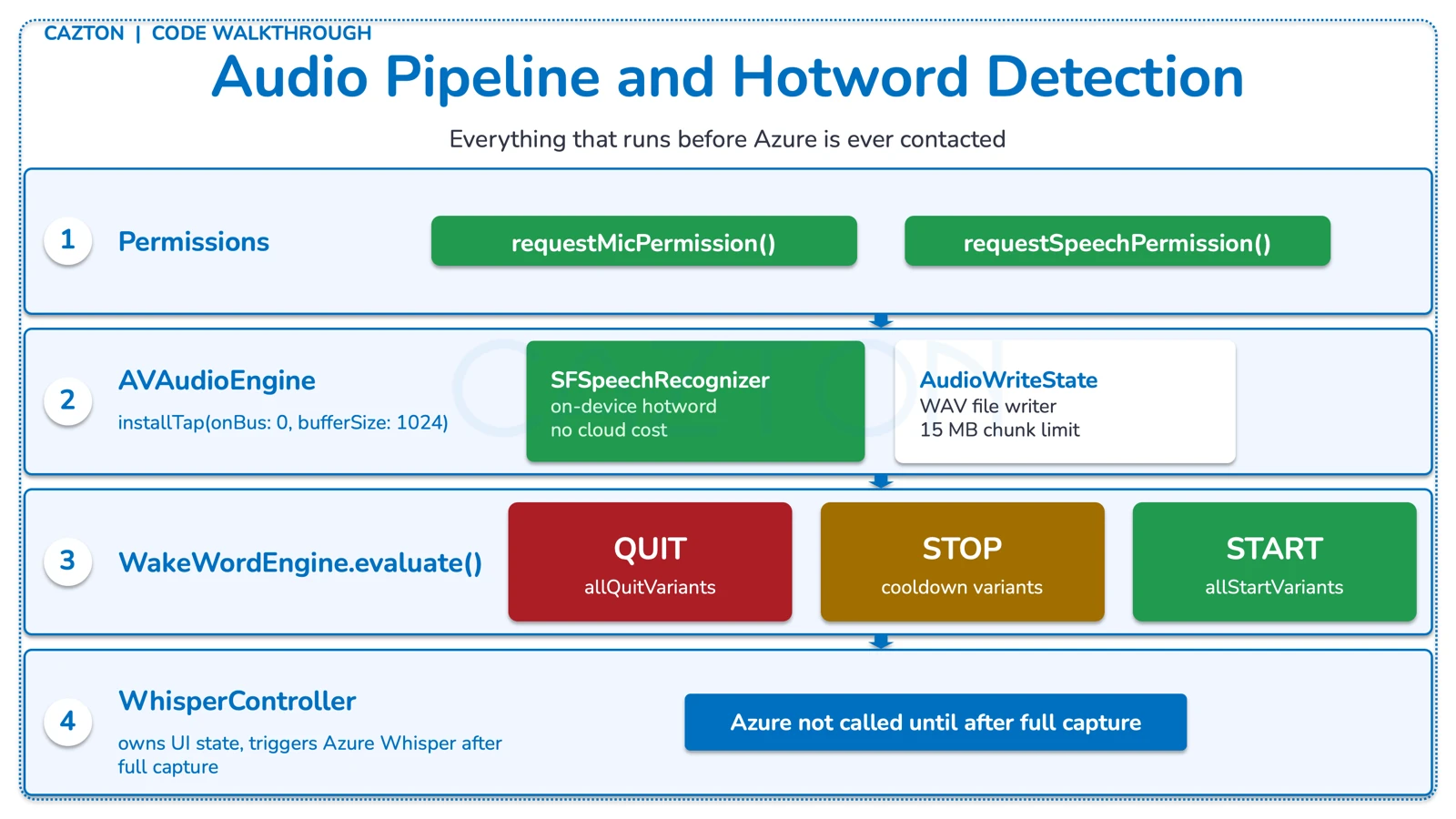
The hotword path stays local. The app asks for microphone and speech permissions, starts an AVAudioEngine, and uses Apple speech recognition to decide when recording should start or stop. That matters for latency, privacy, and cost. Azure is not involved until after the user has recorded something worth transcribing.
WhisperController.swift
private func bootstrap() async {
    let micGranted = await requestMicPermission()
    let speechGranted = await requestSpeechPermission()
    micAuthorized = micGranted
    speechAuthorized = speechGranted

    if micAuthorized && settings.hotwordEnabled && speechAuthorized {
        startAudioPipeline(enableRecognition: true)
    }
}

private func startAudioPipeline(enableRecognition: Bool) {
    let inputNode = audioEngine.inputNode
    let format = inputNode.outputFormat(forBus: 0)
    inputNode.installTap(onBus: 0, bufferSize: 1024, format: format, block: tapHandler)
    try audioEngine.start()
    configureSpeechRecognition(enabled: enableRecognition)
}
One tap, two consumers: the audio tap feeds both the current speech-recognition request and the audio writer. The helper makeAudioTapHandler appends the same incoming buffer to RecognitionRequestState and AudioWriteState, which keeps the pipeline simple and avoids duplicated capture infrastructure.
Wake word decisions are rule-based on purpose. The trigger logic is explicit and conservative. The code tracks high-confidence and low-confidence mishearing variants for "Cazton", requires a leading "hey" for riskier words, and adds cooldown windows to suppress chatter and accidental re-triggering.
WakeWordEngine.swift
mutating func evaluate(words: [String], isRecording: Bool, now: Date) -> WakeWordDecision {
    if words.matchesAny(HotwordPhrases.allQuitVariants) {
        return WakeWordDecision(action: .quit, suppression: nil)
    }

    if isRecording {
        guard words.matchesAny(HotwordPhrases.allStopVariants) else { return .none }
        guard now.timeIntervalSince(lastStopAt) > stopCooldown else {
            return WakeWordDecision(action: .none, suppression: .stopCooldown)
        }
        lastStopAt = now
        return WakeWordDecision(action: .stop, suppression: nil)
    }

    let startMatched = words.matchesAny(HotwordPhrases.allStartVariants)
        || lastWordIsCaztonVariant(in: words, requireHeyBefore: true)
    guard startMatched else { return .none }
    guard !words.matchesAny(HotwordPhrases.allStopVariants) else {
        return WakeWordDecision(action: .none, suppression: .trailingStopPhrase)
    }
    return WakeWordDecision(action: .start, suppression: nil)
}
Why not fuzzy matching everywhere? A voice utility that starts recording by accident is worse than one that occasionally misses a phrase. The curated variant lists in HotwordPhrases.swift encode the actual mishear patterns from Apple speech and Whisper, then the wake-word engine adds cooldown and post-stop guards to keep the app from bouncing between states.
The controller also includes maintenance logic that restarts speech recognition periodically and applies exponential backoff after recognition errors. Those are the details that keep a long-running menu bar app stable instead of gradually degrading after device changes or recognizer hiccups.
Recording, Chunk Rotation, and Ordered Transcription
Recording starts instantly after the wake-word engine fires. The controller writes temporary WAV files, rotates chunks before they get too large, and then hands the completed chunk list to an actor that transcribes them in order.
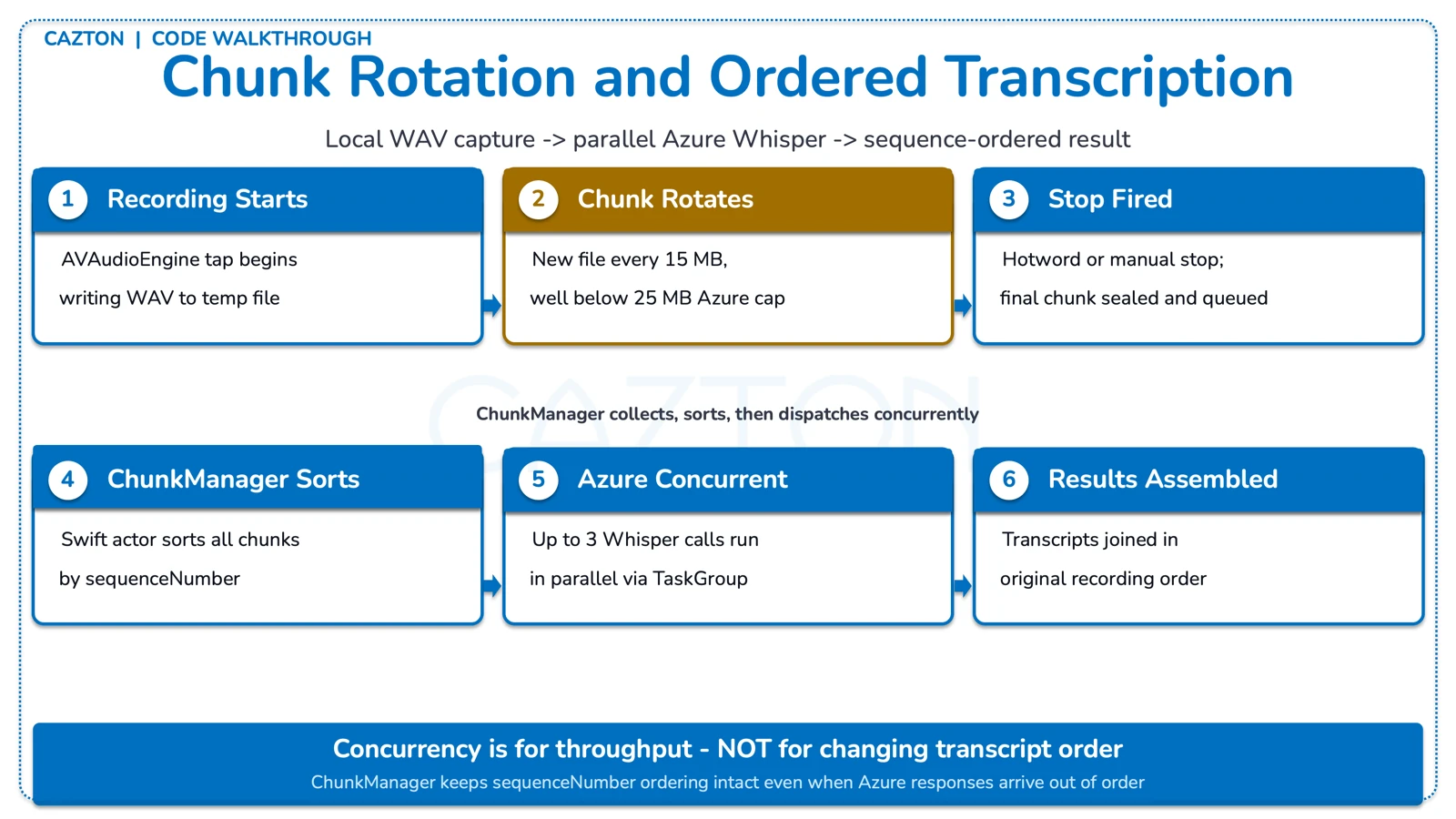
Azure Whisper accepts file uploads rather than a continuous audio stream in this implementation, so the safest approach is to capture locally, split early, and upload clean chunks. The code uses a 15 MB safety limit instead of waiting until the 25 MB service boundary becomes a failure case.
WhisperController.swift
private func startAudioWriting(file: AVAudioFile) {
    audioWriteState.start(file: file, maxChunkSize: 15_000_000) { [weak self] in
        Task { @MainActor in
            self?.rotateChunk()
        }
    }
}

private func stopRecording(reason: String) {
    guard isRecording else { return }
    isRecording = false
    audioWriteState.stop()

    if let currentURL = currentChunkURL {
        let chunkSeq = currentChunkSequence
        Task {
            await chunkManager.addChunk(url: currentURL, sequenceNumber: chunkSeq)
            await transcribeAllChunks(startedByHotword: recordingStartedByHotword)
        }
    }
}
Design decision: chunk rotation happens well below the cloud cap so the app has headroom for format overhead and edge cases. That keeps the recording experience predictable: long sessions do not suddenly fail because one file crossed a service threshold.
An actor keeps chunk processing ordered and safe. ChunkManager owns the temporary chunk list, assigns concurrency, and rejoins the transcripts in sequence-number order. That means the controller can stay focused on UI state while the actor handles the mechanics of parallel transcription and cleanup.
ChunkManager.swift
actor ChunkManager {
    private let maxCloudConcurrentTranscriptions = 3

    func transcribeAllChunks(
        transcriber: WhisperTranscriber,
        endpoint: URL,
        apiKey: String,
        provider: Provider
    ) async throws -> String {
        let sortedChunkInfos = chunks
            .sorted { $0.sequenceNumber < $1.sequenceNumber }
            .map { (id: $0.id, url: $0.url) }

        await withTaskGroup(of: (UUID, Result<String, Error>).self) { group in
            ...
        }

        return transcripts.joined(separator: " ")
    }
}
The complete post-stop sequence runs as follows: Chunk 1 is saved, Chunk 2 is saved, Chunk 3 is saved. ChunkManager sorts by sequence number. Up to 3 Azure transcriptions run concurrently. Results are reassembled in original order. Temporary chunk files are deleted during cleanup.
Why this matters: concurrency is used for throughput, not for changing the transcript order. The actor keeps the chunks sorted by sequenceNumber, so the final text matches the original recording even when cloud requests finish out of order.
Azure Whisper Integration and Endpoint Handling
The cloud side is intentionally straightforward: accept several reasonable Azure URL shapes, normalize them into the final Whisper endpoint, post multipart audio, and surface a readable error if Azure returns a problem.
Settings are persisted, but environment fallback still works. SettingsStore prefers the values the user already saved in UserDefaults, then falls back to environment variables or a local .env file. That makes the app easy to run in development and still convenient for everyday use after the first launch.
SettingsStore.swift
endpoint = !persistedEndpoint.isEmpty ? persistedEndpoint : firstEnvValue(
    keys: [
        "HEYCAZTON_ENDPOINT",
        "AZURE_WHISPER_ENDPOINT",
        "AZURE_OPENAI_WHISPER_ENDPOINT",
        "TargetUri"
    ],
    environment: env,
    dotenv: dotenv
) ?? ""

var resolvedEndpoint: URL? {
    WhisperEndpointResolver.resolve(endpoint: endpoint, deployment: deployment)
}
Endpoint normalization handles real-world pasted input. Users paste Azure endpoints in all kinds of shapes: a base resource URL, a deployment URL, a partial audio path, or a fully formed transcription or translation endpoint. WhisperEndpointResolver treats that as normal and resolves all of them into a clean request URL with the correct API version attached.
WhisperEndpointResolver.swift
static func resolve(endpoint: String, deployment: String, mode: WhisperEndpointMode = .transcriptions) -> URL? {
    let trimmed = endpoint.trimmingCharacters(in: .whitespacesAndNewlines)
    let fallbackDeployment = deployment.trimmingCharacters(in: .whitespacesAndNewlines).isEmpty ? "whisper" : deployment

    if lowercasedPath.contains("/audio/transcriptions") || lowercasedPath.contains("/audio/translations") {
        // keep full endpoint
    } else if let deploymentsIndex = lowercasedSegments.firstIndex(of: "deployments") {
        components.path = "/openai/deployments/\(resolvedDeployment)/audio/\(mode.rawValue)"
    } else {
        components.path = "/openai/deployments/\(fallbackDeployment)/audio/\(mode.rawValue)"
    }

    components.queryItems = [URLQueryItem(name: "api-version", value: "2024-06-01")]
    return components.url
}
Resolver examples: a base resource URL like https://example.openai.azure.com resolves to https://example.openai.azure.com/openai/deployments/whisper/audio/transcriptions?api-version=2024-06-01. A translations URL passes through with only the API version query parameter appended. All common pasted formats converge on a valid, versioned request URL.
Transcription requests use plain multipart HTTP. The transcriber builds a multipart body around the captured file, sets both api-key and Authorization headers, then accepts either text or transcription as the response field. Error bodies are parsed for a readable Azure message instead of thrown away as generic status codes.
WhisperTranscriber.swift
func transcribe(url: URL, endpoint: URL, apiKey: String, provider: Provider) async throws -> String {
    var request = URLRequest(url: endpoint)
    request.httpMethod = "POST"
    request.setValue("multipart/form-data; boundary=\(boundary)", forHTTPHeaderField: "Content-Type")
    request.setValue(trimmedKey, forHTTPHeaderField: "api-key")
    request.setValue("Bearer \(trimmedKey)", forHTTPHeaderField: "Authorization")

    let body = try buildMultipartBody(fileURL: url, boundary: boundary)
    request.httpBody = body

    let (data, response) = try await URLSession.shared.data(for: request)
    return try parseTranscript(from: data)
}
Extensibility point: the provider abstraction is small today because the current app ships with Azure only. Even so, the boundary is already there: the controller asks for a provider, the settings store holds it, and the chunk manager adjusts concurrency based on whether a provider is local or remote.
Transcript Cleanup, UI Polish, and State Management
The app feels finished because it cleans up after the speech system and because the UI exposes the right state at the right time. Voice apps get clumsy quickly when they leak control phrases or hide what they are doing.
Sanitization removes commands without deleting the user's sentence. When a recording starts through the hotword path, the returned text often begins with the trigger phrase and ends with some version of the stop phrase. The sanitizer strips those control phrases, handles multiple misheard variants, removes filler like "um", and keeps the user content intact.
WhisperTranscriptSanitizer.swift
static func sanitize(_ text: String, startedByHotword: Bool) -> String {
    var result = text.trimmingCharacters(in: .whitespacesAndNewlines)

    if startedByHotword {
        result = stripLeadingCommand(result, phrase: HotwordPhrases.start)
        for variant in HotwordPhrases.whisperCaztonVariants {
            result = stripLeadingCommand(result, phrase: "hey \(variant)")
        }
    }

    result = stripAllTrailingStopCommands(result)
    result = removeFillerWord(result, word: "um")
    return collapseWhitespace(result).trimmingCharacters(in: .whitespacesAndNewlines)
}
Sanitizer examples: the input "Hey cazton. Hello there. Stop cazton." produces the output "Hello there." The input "What time is it? Stop, cazton... stop casten! stop casting." produces "What time is it?" All control phrase variants are removed while the user's actual dictation is preserved.
The SwiftUI surface is small, but it covers the real workflow. MenuContentView is not overloaded with decorative UI. It gives the user the core controls, a transcript preview, inline Azure configuration, a hotword toggle, appearance switching, and a file transcription path with both picker and drag-and-drop support.
MenuContentView.swift
VStack(spacing: 0) {
    ScrollView {
        header
        primaryControls
        TranscriptPreview(...)
        DisclosureGroup { WhisperSettingsFields(...) }
        Toggle("Enable \"Hey Cazton\" hotword", isOn: $settings.hotwordEnabled)
        AppearancePicker(settings: settings)
        DisclosureGroup { FileDropZone(...) }
    }
    footer
}
State is shared, not duplicated: the popover, menu bar icon, and recording HUD all observe the same WhisperController. That gives the app one source of truth for whether it is listening, recording, transcribing, errored, or idle.
The recording HUD is another important polish detail. RecordingHUDController creates a floating NSPanel that can join all spaces, stay visible during long work, and let the user stop recording without reopening the menu bar popover. That is a strong fit for a voice utility because the primary interaction usually happens while the user is focused somewhere else.
Small details that matter: the app updates the menu bar icon based on recording state, masks the saved API key in the UI, applies appearance changes across open windows immediately, and uses custom Nunito fonts plus bundled Cazton logos for a consistent branded experience.
Build, Package, and Test Strategy
The delivery path stays transparent. The app is built with Swift Package Manager, assembled into a macOS application bundle by script, redeployed locally with another script, and optionally wrapped into a DMG for distribution.
The build script assembles the bundle manually. build_app.sh runs a release build, creates the .app directory structure, copies the binary and Info.plist, and optionally generates an icon. That keeps packaging predictable and easy to debug.
build_app.sh
swift build -c release --package-path "$ROOT_DIR"

mkdir -p "$APP_DIR/Contents/MacOS" "$APP_DIR/Contents/Resources"
cp "$BIN_PATH" "$APP_DIR/Contents/MacOS/$APP_NAME"
cp "$ROOT_DIR/Resources/Info.plist" "$APP_DIR/Contents/Info.plist"
printf "APPL????" > "$APP_DIR/Contents/PkgInfo"
Redeploy and DMG scripts shorten the loop. redeploy.sh stops the running app if needed, installs the new bundle into /Applications or ~/Applications, and launches it again. package_dmg.sh stages the app, adds an Applications shortcut and install instructions, then creates a compressed DMG with hdiutil.
Distribution reality: the package script is honest about the current state. This build is unsigned and not notarized. The DMG includes a text file that explains the installation flow and the likely Gatekeeper prompt on first open.
Tests focus on the places where subtle bugs are expensive. The repo includes focused tests for endpoint resolution, transcript sanitization, and hotword phrase handling. Those are exactly the areas where a tiny regression can make the product feel broken even when the main recording pipeline still works.
Tests
baseResourceBuildsTranscriptionsEndpoint()
deploymentPathBuildsTranscriptionsEndpoint()
whitespaceInUrlIsStrippedWhenNeeded()

stripsTrailingStopCaztonWithPunctuation()
stripsMixedVariantsWithPunctuationAtEnd()
stripsBothCommands()
Hey Cazton works because each layer is narrow and deliberate: AppKit owns the menu bar shell, SwiftUI owns the interface, Apple speech handles the hotword locally, the audio writer protects the Azure upload boundary, and Azure Whisper is called only for the part that benefits from cloud transcription. The end result is not just a voice demo. It is a practical desktop utility with clear state ownership, predictable packaging, and enough defensive code around speech, audio, and endpoint handling to behave like a real product.
Find Hey Cazton here! Just say the words and see the gain in productivity.
Cazton's AI consulting team helps enterprises design and ship production-grade voice transcription systems. Contact us to discuss how your organization can build on patterns like these.
Cazton is composed of technical professionals with expertise gained all over the world and in all fields of the tech industry and we put this expertise to work for you. We serve all industries, including banking, finance, legal services, life sciences & healthcare, technology, media, and the public sector. Check out some of our services:
- Artificial Intelligence
- Big Data
- Web Development
- Mobile Development
- Desktop Development
- API Development
- Database Development
- Cloud
- DevOps
- Enterprise Search
- Blockchain
- Enterprise Architecture
Cazton has expanded into a global company, servicing clients not only across the United States, but in Oslo, Norway; Stockholm, Sweden; London, England; Berlin, Germany; Frankfurt, Germany; Paris, France; Amsterdam, Netherlands; Brussels, Belgium; Rome, Italy; Sydney, Melbourne, Australia; Quebec City, Toronto Vancouver, Montreal, Ottawa, Calgary, Edmonton, Victoria, and Winnipeg as well. In the United States, we provide our consulting and training services across various cities like Austin, Dallas, Houston, New York, New Jersey, Irvine, Los Angeles, Denver, Boulder, Charlotte, Atlanta, Orlando, Miami, San Antonio, San Diego, San Francisco, San Jose, Stamford and others. Contact us today to learn more about what our experts can do for you.
