

Code Walkthrough: AI Agent Memory Patterns
- Python implementation walkthrough: All four memory strategies are implemented in Python with the same Azure Cosmos DB partition design and metrics interface, covering Sliding Window, Hierarchical 3-Tier, Entity Graph, and a Direct LLM baseline.
- Identity and numeric anchoring: Sliding Window uses regex pattern matching to extract critical facts like identity, budgets, and dates, then stores them separately so they are never lost when older messages get compressed into a rolling summary.
- Hierarchical storage tiers: Hierarchical 3-tier memory stores recent messages verbatim, mid-range history as compressed summaries, and the oldest content as distilled facts, each in a separately queryable tier in Azure Cosmos DB so performance stays consistent as sessions grow.
- Entity extraction and merging: Entity Graph runs LLM-based structured JSON extraction plus regex hints on each user message, merges new facts with existing entity documents in Cosmos DB, and regenerates embeddings only when the searchText changes.
- Adaptive retrieval modes: The Entity Graph retrieval engine supports vector-only, full-text-only, and Hybrid RRF modes in Azure Cosmos DB for NoSQL with adaptive top-K and a CONTAINS-based lexical fallback, providing reliable recall across all query types.
- Production extraction reliability: A four-attempt JSON extraction fallback chain doubles token budgets on retry and switches to a fallback model on failure, ensuring reliable entity extraction for production AI agent deployments.
- Benchmark companion: This implementation walkthrough is the companion to AI Agent Memory Patterns, which benchmarks all four strategies on recall, token cost, and latency against a live Cazton seed dataset.
- Top clients: We help Fortune 500, large, mid-size, and startup companies with AI development, consulting, and hands-on training services. Our clients include Microsoft, Google, Broadcom, Thomson Reuters, Bank of America, Macquarie, Dell, and more.
The Foundation - Data Models and Storage
A guided walkthrough of the four memory strategy implementations. Each section covers the actual Python behind Sliding Window, Hierarchical 3-Tier, and Entity Graph retrieval, built on Azure Cosmos DB for NoSQL. This article is the implementation companion to AI Agent Memory Patterns, which benchmarks all four strategies on recall, token cost, and latency against a live Cazton seed dataset.
Before we look at any strategy, we need to understand how data moves in and out of Cosmos DB. All four strategies share the same Pydantic models; the three stateful strategies share the same message-document layer, while direct_llm.py only persists session metadata.
The Strategy and Metrics Models
Every chat request specifies a strategy. Every response returns standardized metrics including token counts, latency, and how many turns are stored versus sent. This is how we compare apples-to-apples across strategies.
Python - models.py
class Strategy(str, Enum):
    direct_llm     = "direct_llm"
    sliding_window = "sliding_window"
    hierarchical   = "hierarchical"
    entity_graph   = "entity_graph"

class Metrics(BaseModel):
    prompt_tokens:      int
    completion_tokens:  int
    total_tokens:       int
    latency_ms:         float
    memory_turns_stored: int
    context_turns_sent:  int
Why this matters: Every strategy returns the same Metrics object. The memory_turns_stored vs. context_turns_sent gap reveals compression efficiency: Entity Graph might store 60 turns but only send the last 6 recent messages plus targeted system context. The demo UI surfaces these numbers after every message.
Message Storage in Cosmos DB
The three stateful strategies store messages as individual documents with sequence numbers. This allows efficient range queries such as "give me messages 20 through 30", which is critical for Sliding Window, Hierarchical, and Entity Graph.
Python - cosmos_messages.py
async def upsert_message(container, *, session_id, seq, role, content, ts, ttl_s=None):
    doc = {
        "id":         f"msg:{seq}",
        "session_id": session_id,
        "doc_type":   "msg",
        "seq":        int(seq),
        "role":       role,
        "content":    content,
    }
    if ttl_s is not None:
        doc["ttl"] = int(ttl_s)      # Cosmos auto-deletes after this many seconds
    await container.upsert_item(doc)
Design Decision: TTL on Messages. Each message has a ttl field. Cosmos DB natively deletes expired documents without requiring cron jobs or cleanup scripts. The Sliding Window uses a 1-hour TTL; the Hierarchical and Entity Graph strategies use 6 hours. This keeps storage lean without application-level garbage collection.
Reading messages back uses Cosmos DB SQL queries scoped to a single partition (session_id). There are two access patterns:
Python - cosmos_messages.py
# Pattern 1: "Give me the most recent N messages"
async def read_recent_messages(container, *, session_id, limit):
    query = (
        f"SELECT TOP {limit} c.seq, c.role, c.content FROM c "
        "WHERE c.session_id = @sid AND c.doc_type = 'msg' "
        "ORDER BY c.seq DESC"          # newest first, then reverse
    )
    ...

# Pattern 2: "Give me messages between seq 20 and 30"
async def read_messages_by_seq_range(container, *, session_id, start_seq, end_seq):
    query = (
        "SELECT c.seq, c.role, c.content FROM c "
        "WHERE c.session_id = @sid AND c.doc_type = 'msg' "
        "AND c.seq >= @start AND c.seq < @end "
        "ORDER BY c.seq ASC"
    )
Partition key = session_id. Every hot-path query is scoped to a single logical partition, which avoids cross-partition scans. The three stateful strategies share this message layer; direct_llm.py keeps only session metadata.
Direct LLM - The Baseline
The simplest strategy: no memory at all. Each turn sends only the system prompt and the current user message. This is the control group we measure everything else against.
Python - direct_llm.py
async def chat(sessions_container, openai_client, session_id, user_message, ...):
    session = await read_or_default(sessions_container, session_id, default={...})
    session["turn_count"] = session["turn_count"] + 1

    messages = [
        {"role": "system",  "content": settings.system_prompt},
        {"role": "user",    "content": user_message},    # That's it. Just 1 message.
    ]

    reply, usage, latency_ms = await create_chat_completion(openai_client, model=..., messages=messages)
    await upsert_item(sessions_container, session)     # Save turn_count only
    return reply, Metrics(context_turns_sent=1, ...)
Captured Response Excerpt
Q: "What are the three headline offerings?"
A: "I don't have access to the Cazton homepage title in this chat, so I can't extract
   the three headline offerings from it."

93 prompt tokens in this captured run | no prior-turn recall
83 lines in the file. No history, no retrieval. The LLM cannot answer recall questions because it never sees prior messages. For this captured Cazton round, prompt_tokens was 93. Everything above that baseline is the cost of memory.
Sliding Window
Keep the last 30 messages verbatim. When older messages fall off the window, summarize them into a rolling snapshot. Anchor critical facts (identity, budgets, tech stack) via regex so they survive summarization.
The Constants
Python - sliding_window.py
WINDOW_SIZE    = 30             # messages kept verbatim
MESSAGE_TTL_S  = 60 * 60         # 1 hour - Cosmos auto-deletes
30 messages = 15 turn pairs (user + assistant). After a 60-message seed dataset, 28 messages have already fallen off the window. Those 28 get compressed into a rolling summary. The question is: does that summary preserve the specific details you need?
Identity Anchoring
When a user says "Hi, I'm John Doe, lead developer at FakeCompany", the system extracts their identity via regex and stores it as a durable anchor that persists outside the summary.
Python - sliding_window.py
def _extract_identity_anchor(user_message):
    intro_with_role = re.search(
        r"(?:i'm|i am|my name is)\s+"
        r"([A-Z][a-z]+(?:\s+[A-Z][a-z]+)*)\s*"     # capture: Name
        r"(?:a|an)?\s*([^,.!?]+?)\s+"              # capture: role
        r"at\s+([A-Z][A-Za-z0-9&._-]+)",          # capture: Company
        text, re.IGNORECASE,
    )
    if intro_with_role:
        return f"User identity: {name}; role: {role}; company: {company}."
Extracted Anchor Example
Input:  "Hi, I'm John Doe, lead developer at FakeCompany"
Output: "User identity: John Doe; role: lead developer; company: FakeCompany."
Numeric Fact Anchoring
Budgets, costs, and accuracy percentages are extracted by regex and stored as session-level fields. They never pass through the summarizer and cannot be summarized away.
Python - sliding_window.py
def _extract_numeric_anchors(user_message):
    out = {}

    base_budget = re.search(r"\bbudget(?:\s+is|\s+of)?\s+\$([0-9,]+)", text)
    if base_budget:
        out["budget_base"] = base_budget.group(1)

    aws_monthly = re.search(r"\$([0-9,]+)/month", text)
    if aws_monthly and "aws" in lower:
        out["aws_monthly_cost"] = aws_monthly.group(1)

    accuracy = re.search(r"(\d+(?:\.\d+)?)%\s+accuracy", text)
    if accuracy and "maria" in lower:
        out["maria_accuracy"] = accuracy.group(1)

    # Also captures: React, FastAPI, PostgreSQL as stack anchors
    return out
Why regex and not the LLM? Because regex is deterministic, free (zero tokens), and instant. We use the LLM for things that require understanding (summarization); we use regex for things that require precision (extracting "$3,500/month" exactly).
The Rolling Summary
When messages fall off the window, they are summarized. The summary prompt is carefully designed to extract only user-stated facts and preserve specific identifiers.
Python - sliding_window.py
SUMMARY_SYSTEM_PROMPT = (
    "Summarize this conversation concisely as a durable MEMORY SNAPSHOT.\n"
    "Rules:\n"
    "- Use ONLY information explicitly stated by the user.\n"
    "- Do NOT invent, assume, or infer missing details.\n"
    "- Preserve specific details: names + roles, numbers/budgets,\n"
    "  dates/deadlines, SLAs, URLs, technology choices, and decisions.\n"
    "Output format:\n"
    "User:\nProject:\nPeople:\nTech:\nRequirements:\n"
    "Dates:\nBudget/Costs:\nIntegrations:\nLinks:\nMetrics:\n"
)
The Chat Flow - Context Assembly
Here is how the Sliding Window builds the messages array that gets sent to the LLM:
Python - sliding_window.py
async def chat(sessions_container, openai_client, session_id, user_message, ...):
    # 1. Load session metadata from Cosmos
    session = await read_or_default(sessions_container, session_id, default={...})

    # 2. Extract anchors from the new message (regex, no LLM call)
    latest_anchor = _extract_identity_anchor(user_message)
    for key, value in _extract_numeric_anchors(user_message).items():
        session[key] = value

    # 3. Store the user message in Cosmos (with 1-hour TTL)
    await upsert_message(..., seq=next_seq, role="user", ttl_s=MESSAGE_TTL_S)

    # 4. Build the prompt: system + summary + anchors + recent turns
    messages = [{"role": "system", "content": settings.system_prompt}]
    if summary:
        messages.append({"role": "system", "content": f"Rolling memory summary (user-stated facts only; may be incomplete):\n{summary}"})
    if identity_anchor:
        messages.append({"role": "system", "content": identity_anchor})
    if numeric_facts:
        messages.append({"role": "system", "content": numeric_facts})
    recent_turns = await read_recent_messages(..., limit=WINDOW_SIZE)
    messages.extend(recent_turns)                # last 30 messages verbatim

    # 5. Call the LLM
    reply, usage, latency_ms = await create_chat_completion(...)

    # 6. If messages overflowed the window, summarize the overflow
    if summarized_until_seq < window_start_seq:
        overflow = await read_messages_by_seq_range(...)
        new_summary = await create_chat_completion(..., messages=summary_messages)
What the LLM receives (after 60 turns)
System: "You are a helpful assistant..."
System: "Rolling memory summary (user-stated facts only; may be incomplete):
         [older user-stated facts summarized here]"
System: "User identity: John Doe; role: lead developer; company: FakeCompany."
System: "Canonical numeric facts (user-stated):
         - Base cloud infrastructure budget: $50,000.
         - Additional approved ML cluster budget: $10,000."
User:   [message #29] "What about the ML training cluster?"
Asst:   [message #30] "The additional approval was $10,000..."
...     (28 more recent messages)
User:   [message #59] "What's the total budget including the ML cluster?"
What Sliding Window Gets Right: Prompt size stays bounded: one rolling summary, anchored system facts, and the last 30 messages. Identity and numeric facts survive window rollover because they live outside the summary.
Where It Breaks: Captured failures showed the weak spot: exact strings that are not anchored can fall out or blur once they exist only in the summary. In the recorded runs, Sliding Window missed details such as github.com/cazton/fakeproject, March 15, /consulting, and cazton.com/contact-us.
Hierarchical - 3-Tier Memory
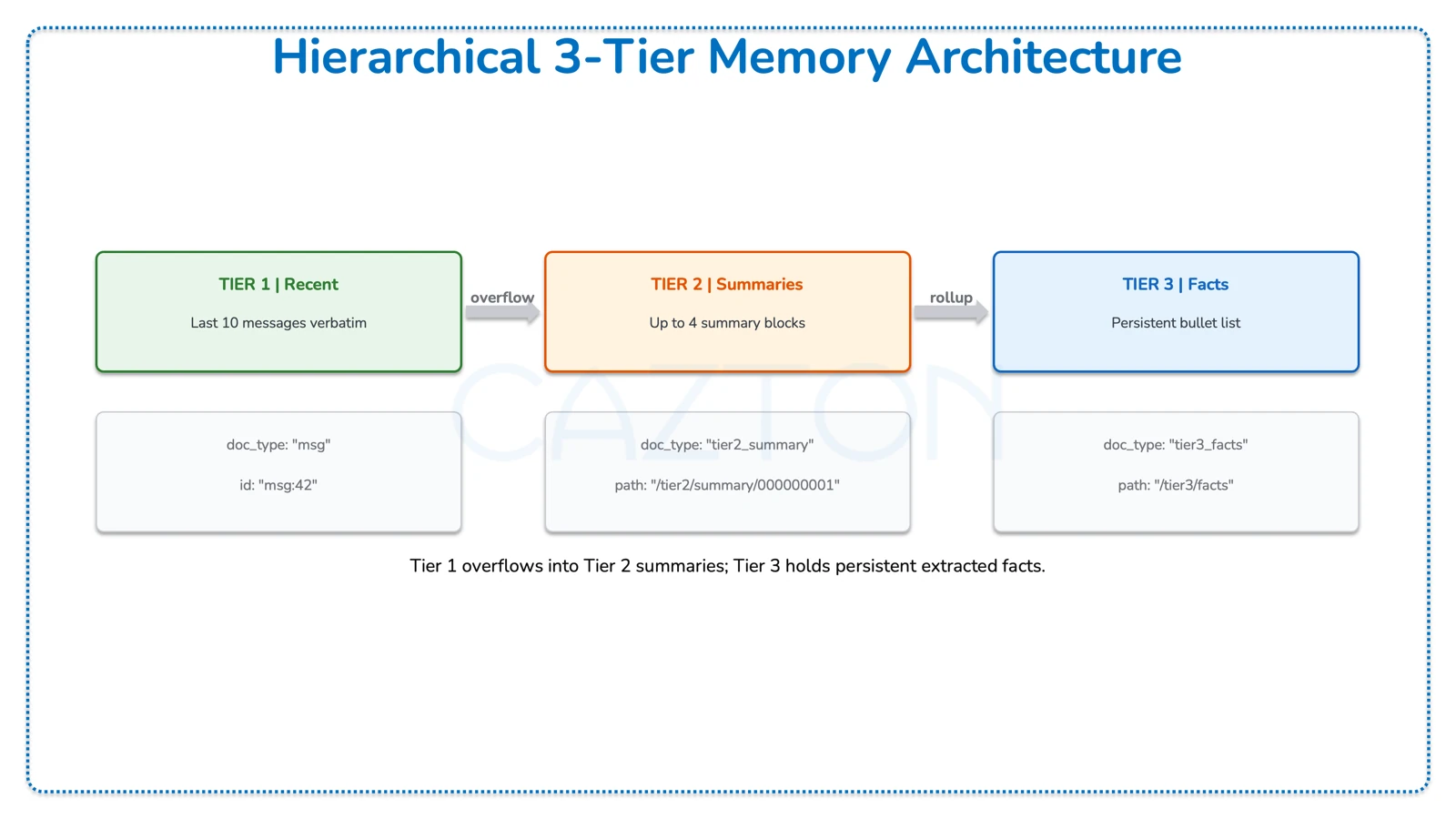
Instead of one rolling summary, this strategy splits memory into three tiers with increasing compression. Recent messages stay verbatim, mid-range messages become summaries, and the oldest content is distilled into bullet-point facts.
The Tier Constants
Python - hierarchical.py
TIER1_SIZE  = 10      # recent messages kept verbatim (5 turn pairs)
TIER2_BLOCK = 10      # messages per summary block
MAX_TIER2   = 4       # max summary blocks before rollup to Tier 3
MESSAGE_TTL_S = 60 * 60 * 6  # 6 hours
3-Tier Architecture in Cosmos DB
| Tier | doc_type | Path / ID Pattern | Description |
|---|---|---|---|
| Tier 1 - Recent | msg |
id: "msg:42" |
Last 10 messages verbatim; overflow triggers Tier 2 summarization |
| Tier 2 - Summaries | tier2_summary |
path: "/tier2/summary/000000001" |
Up to 4 summary blocks, queryable via STARTSWITH |
| Tier 3 - Facts | tier3_facts |
path: "/tier3/facts" |
Persistent bullet list of extracted facts; merged on each rollup |
Tier 2 Block Summarization
When Tier 1 overflows, messages are grouped into blocks of 10 and summarized. Each summary becomes a separate document in Cosmos DB, queryable via materialized paths.
Python - hierarchical.py
# When pending messages exceed TIER2_BLOCK, create a summary block
while pending_len >= TIER2_BLOCK:
    block_messages = await read_messages_by_seq_range(
        sessions_container, session_id=session_id,
        start_seq=block_start, end_seq=block_start + TIER2_BLOCK,
    )
    block_text = _format_user_only(block_messages)

    summary, _, _ = await create_chat_completion(
        openai_client, model=summarizer_model,
        messages=[
            {"role": "system", "content": TIER2_SUMMARY_PROMPT},
            {"role": "user",   "content": block_text},
        ],
    )

    # Store as a separate document with a materialized path
    summary_doc = {
        "id":            f"t2:{tier2_summary_next_index}",
        "session_id":    session_id,
        "doc_type":      "tier2_summary",
        "path":          f"/tier2/summary/{tier2_summary_next_index:09d}",
        "summary":       cleaned_summary,
    }
    await sessions_container.upsert_item(summary_doc)
Materialized paths like /tier2/summary/000000001 enable efficient queries with STARTSWITH. Cosmos DB can query all Tier 2 summaries for a session in a single partition-scoped call without scanning messages.
Querying Tier 2 Summaries
Python - hierarchical.py
async def _list_tier2_summaries(container, session_id):
    query = (
        "SELECT c.id, c.summary_index, c.summary FROM c "
        "WHERE c.session_id = @sid AND c.doc_type = 'tier2_summary' "
        "AND IS_DEFINED(c.path) AND STARTSWITH(c.path, @prefix) "
        "ORDER BY c.summary_index ASC"
    )
    # @prefix = "/tier2/summary/"
Tier 3 Facts Extraction (Rollup)
When the number of Tier 2 summary blocks exceeds 4, the oldest summaries are distilled into persistent facts and then deleted.
Python - hierarchical.py
# When tier2 summaries exceed MAX_TIER2, extract facts and delete old summaries
if len(tier2_summaries) > MAX_TIER2:
    old = tier2_summaries[:-MAX_TIER2]             # oldest summaries to compress

    extraction_parts = []
    existing_facts = await _read_tier3_facts(sessions_container, session_id)
    if existing_facts:
        extraction_parts.append(existing_facts)   # merge with what we already have
    extraction_parts.extend([s["summary"] for s in old])

    new_facts, _, _ = await create_chat_completion(
        openai_client, model=summarizer_model,
        messages=[
            {"role": "system", "content": TIER3_FACTS_PROMPT},
            {"role": "user",   "content": extraction_input},
        ],
    )

    facts_doc = {
        "id": "t3", "doc_type": "tier3_facts",
        "path": "/tier3/facts",
        "facts": cleaned_facts,
    }
    await sessions_container.upsert_item(facts_doc)

    for sdoc in old:                             # delete consumed summaries
        await sessions_container.delete_item(item=sdoc["id"], partition_key=session_id)
Tier 3 Facts Shape (stored in Cosmos DB)
{
  "id": "t3",
  "doc_type": "tier3_facts",
  "path": "/tier3/facts",
  "facts": "- User: John Doe, Senior Developer at FakeCompany\n
            - Team: Jane Doe (frontend), Jack Doe (backend), Mary Doe (data), Tom Doe (DevOps)\n
            - Budget: $50,000 base + $10,000 approved ML cluster\n
            - Stack: React, FastAPI, PostgreSQL\n
            - Deadline: March 15th, 2025\n
            - Sponsor: Dana Doe, VP of Engineering\n
            - Pilot customers: FakeShopOne, FakeShopTwo, FakeShopThree"
}
The Tier 3 Facts Prompt: The extraction prompt is aggressive: "MUST include: who the user is, every person mentioned, all dates/deadlines, all budgets/numbers, all technology decisions." It turns older Tier 2 summaries into a durable bullet list. In the captured runs, that helped Hierarchical retain details such as March 15, 2025 and https://cazton.com/consulting after those facts had aged out of the raw recent-message window.
Hierarchical Context Assembly
The Hierarchical strategy builds the prompt from bottom up: oldest context first, newest last.
Python - hierarchical.py
# Context assembly order (oldest-to-newest):
messages = [{"role": "system", "content": system_prompt}]

if tier3_facts:            # 1. Long-term facts (coldest, most compressed)
    messages.append({"role": "system", "content": f"Long-term memory:\n{tier3_facts}"})
if anchor_msg:             # 2. Numeric/identity anchors (regex-extracted)
    messages.append({"role": "system", "content": anchor_msg})
if summaries_text:         # 3. Tier 2 summary blocks (warm)
    messages.append({"role": "system", "content": f"Recent memory blocks:\n{summaries_text}"})
if pending_user_text:      # 4. Unsummarized user messages (gap filler)
    messages.append({"role": "system", "content": f"Older user messages:\n{pending_user_text}"})
messages.extend(tier1_turns)  # 5. Last 10 messages verbatim (hottest)
Key insight: This ordering matters for the LLM. Models pay more attention to recent context (recency bias). By placing Tier 3 facts earliest and Tier 1 recent turns last, the LLM naturally weighs recent conversation higher while still having access to the full fact base.
Entity Graph
The most sophisticated strategy: extract structured entities from each turn, store them with vector embeddings, and retrieve relevant entities per query. Instead of compressing old messages, we decompose them into facts.
The Extraction Prompt
Every user message is processed through an LLM extraction call that returns structured JSON:
Python - entity_graph.py
EXTRACTION_PROMPT = """Extract entities and facts from the USER message.
Return JSON:
{
  "entities": [
    {
      "name": "entity name (person, place, organization, URL, project, concept, preference)",
      "type": "person|place|organization|preference|fact|project|date|url|concept",
      "facts": ["fact 1", "fact 2"],
      "related_to": ["other entity names"]
    }
  ]
}
IMPORTANT:
- ONLY use information explicitly stated by the user. Ignore assistant text entirely.
- When the user says "I'm [name]" or "my name is [name]", extract that as a person entity.
- Extract ALL clearly stated people, companies, projects, dates,
  budgets/costs, SLAs, URLs, technologies, integrations, preferences.
- For technologies, use type: "concept" with role in facts
  (e.g., "frontend: React", "backend: FastAPI").
- ALWAYS capture numeric values exactly as written.
"""
Extraction Example
Input: "I'm John Doe, a senior developer at FakeCompany. Budget is $50,000.
        We're using React frontend and FastAPI backend."

Output JSON:
{
  "entities": [
    {"name": "John Doe", "type": "person",
     "facts": ["senior developer", "works at FakeCompany"], "related_to": ["FakeCompany"]},
    {"name": "FakeCompany", "type": "organization",
     "facts": ["organization"], "related_to": ["John Doe"]},
    {"name": "Tech Stack", "type": "concept",
     "facts": ["frontend: React", "backend: FastAPI"],
     "related_to": ["React", "FastAPI"]},
    {"name": "$50,000 budget", "type": "fact",
     "facts": ["cloud infrastructure budget"], "related_to": ["FakeCompany"]}
  ]
}
Entity Normalization and Storage
Entity names are normalized into stable keys. When the same entity is mentioned again, its facts get merged, not replaced.
Python - entity_graph.py
def _normalize_entity_key(name):
    s = name.strip().lower().replace(" ", "_")
    s = re.sub(r"^https?://", "", s)           # strip protocol
    s = re.sub(r"[\\/\?#]", "|", s)           # path separators become pipes
    return s

# "John Doe"                        ->  "john_doe"
# "https://cazton.com/consulting"   ->  "cazton.com|consulting"
Upserting with Fact Merging
Python - entity_graph.py
async def _upsert_entity(entities_container, openai_client, *, session_id, entity):
    entity_key = _normalize_entity_key(name)
    entity_id = f"{session_id}::{entity_key}"   # globally unique within session

    existing = await _read_entity(entities_container, entity_id=entity_id, session_id=session_id)

    if existing:
        # MERGE: combine old facts with new, deduplicate, preserve order
        merged_facts   = _dedupe_preserve_order(existing["facts"] + facts)
        merged_related = _dedupe_preserve_order(existing["related_to"] + related_to)

        # Rebuild search text and re-embed if it changed
        search_text = _build_search_text(name, type_, merged_facts, merged_related)
        if search_text != existing.get("searchText"):
            embedding = await create_embedding(openai_client, input_text=search_text)
    else:
        # NEW entity: build search text and embed from scratch
        search_text = _build_search_text(name, type_, facts, related_to)
        embedding = await create_embedding(openai_client, input_text=search_text)

    doc = {"id": entity_id, "session_id": session_id, "name": name,
           "facts": merged_facts, "searchText": search_text,
           "embedding": embedding, ...}
    await entities_container.upsert_item(doc)
Building the Search Text
Each entity's searchable representation is a single flattened string. This one field is reused across embeddings, full-text ranking, and lexical fallback:
Python - entity_graph.py
def _build_search_text(name, type_, facts, related_to):
    parts = []
    if name:        parts.append(name)
    if type_:       parts.append(type_)
    parts.extend(facts)
    parts.extend(related_to)
    return " ".join(parts).strip().lower()
Search Text Example
Entity:  John Doe (person) | facts: ["senior developer", "works at FakeCompany"]
         related_to: ["FakeCompany"]

searchText: "john doe person senior developer works at fakecompany fakecompany"

This single string is reused for:
  1. Embeddings when vector search is enabled
  2. Cosmos full-text ranking when full-text search is enabled
  3. CONTAINS-based lexical fallback
Entity Graph Data Flow
The following describes the full data flow from a user message to an injected prompt context bullet list:
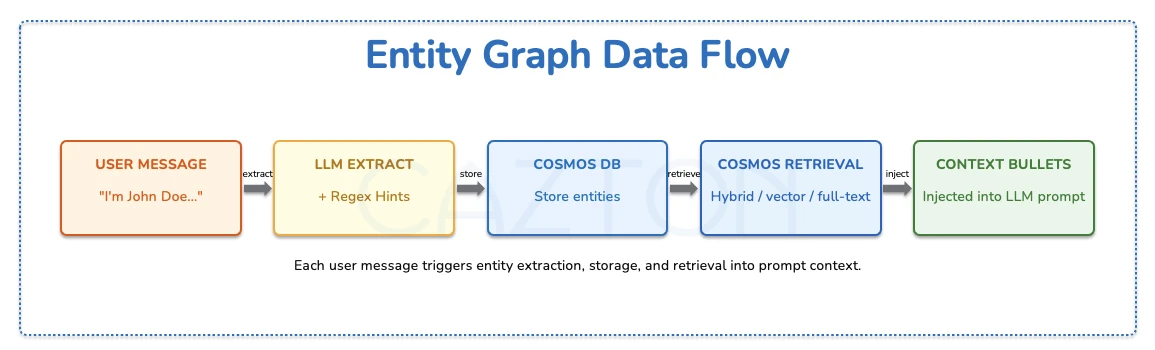
| Stage | Component | Description |
|---|---|---|
| 1. Input | User Message | "I'm John Doe..." - the raw text from the user turn |
| 2. Extract | LLM Extract + Regex Hints | LLM structured JSON extraction plus regex hint backup running in parallel |
| 3. Store | Cosmos DB entity_graph_entities |
Entity documents with facts + embeddings + searchText, merged with existing docs |
| 4. Retrieve | Cosmos DB Retrieval | Hybrid RRF / vector / full-text search with adaptive top-K and lexical fallback |
| 5. Format | Context Bullets | Retrieved entities formatted as bullet list via _entities_to_bullets() |
| 6. Inject | LLM Prompt | Bullet list inserted as system message before recent turns |
From Entities to Prompt
Retrieved entities are formatted into a compact bullet list that becomes part of the system message:
Python - entity_graph.py
def _entities_to_bullets(entities):
    lines = []
    for e in entities:
        name    = e["name"]
        type_   = e["type"]
        facts   = e.get("facts", [])
        related = e.get("related_to", [])[:6]
        related_suffix = f" (related: {', '.join(related)})" if related else ""
        if facts:
            lines.append(f"- {name} ({type_}): {'; '.join(facts)}{related_suffix}")
        else:
            lines.append(f"- {name} ({type_}){related_suffix}")
    return "\n".join(lines)
Bullet Output (injected into system message)
- John Doe (person): senior developer; works at FakeCompany (related: FakeCompany)
- FakeCompany (organization): organization (related: John Doe)
- Tech Stack (concept): frontend: React; backend: FastAPI (related: React, FastAPI)
- FakeShopOne (organization): pilot customer; soft launch pilot customer (related: soft launch)
- https://github.com/cazton/fakeproject (url)
In the captured Cazton rounds, URLs behaved like first-class entities. Because they are stored individually, retrieval can bring back https://cazton.com/consulting, https://cazton.com/products, and https://cazton.com/images/common/cazton-cover.webp without depending on a summary to preserve them.
Hint-Based Extraction (Regex Backup)
Because LLM extraction can occasionally miss patterns, the system runs a parallel regex-based extraction to catch common structures like user introductions and pilot customer lists.
Python - entity_graph.py
def _extract_hint_entities_from_user_message(user_message):
    hints = []

    # Pattern 1: "Hi, I'm [Name], a [role] at [Company]"
    intro = re.search(r"(?:i'm|i am)\s+([A-Z][a-z]+...)\s+at\s+([A-Z]...)", text)
    if intro:
        hints.append({"name": name, "type": "person",
                      "facts": [role, f"works at {company}"]})
        hints.append({"name": company, "type": "organization"})

    # Pattern 2: "pilot customers are: X, Y, and Z"
    pilot = re.search(r"pilot customers?\s+are\s*:\s*([^\n.]+)", text)
    if pilot:
        for name in re.split(r",|\band\b", pilot.group(1)):
            hints.append({"name": name, "type": "organization",
                          "facts": ["pilot customer"]})
Belt and Suspenders: LLM extraction + regex hints are merged and deduplicated before storage. The LLM handles nuance; regex catches rigid patterns like self-introductions and pilot-customer lists. Both paths feed the same upsert flow, so one extractor missing a detail does not automatically lose it.
The Retrieval Engine
Entity Graph doesn't send all entities as context because that would blow up the token count. Instead, it retrieves only the entities relevant to the current query using Cosmos DB's native search capabilities.
Adaptive Top-K
Questions get more retrieval results than statements:
Python - entity_graph.py
def _is_question(text):
    if text.strip().endswith("?"):
        return True
    words = {w.lower() for w in re.findall(r"\b\w+\b", text)}
    return bool(words & QUESTION_WORDS)    # {"what","who","how","tell","recall"...}

def _top_k_for_query(text):
    return 30 if _is_question(text) else 15   # questions need broader context
Three Search Modes in Cosmos DB
The retrieval function supports three modes. Shown here is the combined Hybrid RRF mode, which merges vector similarity and keyword relevance into a single ranked result:
Python - entity_graph.py
# Hybrid RRF: combines semantic + keyword scoring
query = (
    f"SELECT TOP {k} c.id, c.name, c.type, c.facts, c.related_to FROM c "
    "WHERE c.session_id = @sid "
    "ORDER BY RANK RRF("
    "  FULLTEXTSCORE(c.searchText, @searchString),"
    "  VectorDistance(c.embedding, @queryVector)"
    ")"
)
RRF = Reciprocal Rank Fusion. An entity might rank #3 by vector similarity but #1 by keyword match. RRF merges both signals server-side inside Cosmos DB. The system also supports vector-only mode (ORDER BY VectorDistance) and full-text-only mode (ORDER BY RANK FULLTEXTSCORE) as fallbacks when only one capability is provisioned.
Lexical Fallback
After vector/full-text retrieval, a supplementary keyword search catches entities that semantic search might miss, especially for exact-match queries like budget amounts or specific URLs.
Python - entity_graph.py
# After primary retrieval, run a lexical keyword search as supplement
keywords = _extract_query_keywords(query_text)   # stop-word filtered, max 6
if keywords:
    contains_terms = " OR ".join(
        [f"CONTAINS(c.searchText, @kw{i}, true)" for i in range(len(keywords))]
    )
    lexical_query = (
        f"SELECT TOP {k} c.id, c.name, c.type, c.facts, c.related_to FROM c "
        "WHERE c.session_id = @sid "
        f"AND ({contains_terms})"
    )
    # Merge and deduplicate: primary results take priority
    rows = _merge_entity_rows(primary_rows, lexical_rows, limit=k)
Why This Helps on Exact Strings: In the captured Cazton profile rounds, exact strings like /consulting, /products, and cazton-cover.webp were the difference. The lexical supplement is there for those exact matches, while Cosmos ranking handles the broader semantic relevance.
Context Assembly Compared
All three memory strategies build a messages array for the LLM. The difference is what goes into it, and that determines both token cost and recall accuracy.
Entity Graph Context Assembly
Entity Graph sends only the system prompt, the user's identity, retrieved entity bullets, and the last 3 turn pairs (6 messages):
Python - entity_graph.py
# Entity Graph context assembly
messages = [{"role": "system", "content": system_prompt}]

if user_entity:                   # "The user is John Doe"
    messages.append({"role": "system", "content":
        f'The user is {user_entity}. When the user says "I", "me", or "my", it refers to {user_entity}.'})

if retrieved:                      # relevant entity bullets from vector search
    bullets = _entities_to_bullets(retrieved)
    messages.append({"role": "system", "content": bullets})

recent_turns = await read_recent_messages(..., limit=RECENT_TURNS_KEPT * 2)
messages.extend(recent_turns)      # only last 6 messages (3 turn pairs)
Side-by-Side Comparison
| Component | Sliding Window | Hierarchical | Entity Graph |
|---|---|---|---|
| 1st message block | System prompt | System prompt | System prompt |
| 2nd message block | Rolling summary | Tier 3 facts | User identity |
| 3rd message block | Identity anchor | Anchors | Retrieved entity bullets |
| 4th message block | Numeric facts | Tier 2 summaries | Last 6 messages |
| 5th message block | Last 30 messages | Pending messages | |
| 6th message block | Last 10 messages | ||
| Bound | bounded by summary + last 30 messages | bounded by tiers + last 10 messages | depends on retrieved entities + last 6 messages |
The tradeoff is structural, not a single fixed token number. Sliding Window sends the most raw message history. Hierarchical compresses older history into tiers. Entity Graph sends fewer recent messages but adds targeted retrieved facts. In the captured runs, token cost moved up or down with the question; precision came from how well each strategy preserved exact details.
User Identity Detection
Entity Graph has a dedicated LLM call to determine who the user is, separate from entity extraction, so it can answer "Who am I?" accurately:
Python - entity_graph.py
USER_IDENTITY_PROMPT = """Analyze this message.
ONLY extract a name if the user is EXPLICITLY introducing THEMSELVES.
Return JSON: {"user_name": "Name"} or {"user_name": null}.

POSITIVE: "Hi, I'm Jordan Park" -> {"user_name": "Jordan Park"}
NEGATIVE: "Tell me about Mary"  -> {"user_name": null}

CRITICAL: Asking ABOUT someone is NOT the same as BEING that person."""

# When user asks "Who am I?", pin their entity to top of retrieval
if user_entity and _asks_for_self_identity(user_message):
    pinned = await _read_entity(entities_container, entity_id=..., session_id=...)
    retrieved = _merge_entity_rows([pinned], retrieved, limit=k)
JSON Extraction Reliability
LLM JSON extraction isn't always reliable. The system uses a fallback chain to handle parsing failures:
Python - entity_graph.py
async def _extract_json_with_fallback(openai_client, *, primary_model, fallback_model, ...):
    # Attempt 1: primary model, normal token budget
    data = await _call(primary_model, max_tokens=max_completion_tokens)
    if data: return data

    # Attempt 2: same model, doubled token budget (truncation fix)
    data = await _call(primary_model, max_tokens=min(max_completion_tokens * 2, 1200))
    if data: return data

    # Attempt 3: fallback model, normal tokens
    if fallback_model != primary_model:
        data = await _call(fallback_model, max_tokens=max_completion_tokens)
        if data: return data

    # Attempt 4: fallback model, doubled tokens
    return await _call(fallback_model, max_tokens=retry_tokens) or {}
Four attempts before giving up. A common failure mode is truncated JSON output (incomplete closing braces). Doubling the token budget on retry often fixes that. Using a different fallback model covers cases where one model fails on a particular input pattern.
The Architecture Pattern
Connecting Code to Demo: The demo results map directly to these files. Sliding Window misses on /consulting, github.com/cazton/fakeproject, and March 15 follow from WINDOW_SIZE = 30 plus one rolling summary. Entity Graph passes on those rounds come from _retrieve_entities, which uses native Cosmos retrieval (RRF, FULLTEXTSCORE, VectorDistance, plus lexical merge) over stored entity documents. Same partition key, same database, different memory policy in each Python file.
All four strategies share the same Cosmos DB partition design (session_id) and the same metrics model. The three memory strategies also share the same message-document pattern, while direct_llm.py stays session-only.
The architecture difference lives in application code, not in a different database stack. Sliding Window is the simplest bounded-context layer; Hierarchical adds tiered compression; Entity Graph adds retrieval-oriented precision for exact recall.
Cazton is composed of technical professionals with expertise gained all over the world and in all fields of the tech industry and we put this expertise to work for you. We serve all industries, including banking, finance, legal services, life sciences & healthcare, technology, media, and the public sector. Check out some of our services:
- Artificial Intelligence
- Big Data
- Web Development
- Mobile Development
- Desktop Development
- API Development
- Database Development
- Cloud
- DevOps
- Enterprise Search
- Blockchain
- Enterprise Architecture
Cazton has expanded into a global company, servicing clients not only across the United States, but in Oslo, Norway; Stockholm, Sweden; London, England; Berlin, Germany; Frankfurt, Germany; Paris, France; Amsterdam, Netherlands; Brussels, Belgium; Rome, Italy; Sydney, Melbourne, Australia; Quebec City, Toronto Vancouver, Montreal, Ottawa, Calgary, Edmonton, Victoria, and Winnipeg as well. In the United States, we provide our consulting and training services across various cities like Austin, Dallas, Houston, New York, New Jersey, Irvine, Los Angeles, Denver, Boulder, Charlotte, Atlanta, Orlando, Miami, San Antonio, San Diego, San Francisco, San Jose, Stamford and others. Contact us today to learn more about what our experts can do for you.
